
On this page
In short
Graphist is software where our team sets up your brand once: your real files, rules and templates. With all your files (logos, fonts, colors, guidelines), a first version of your brand is ready within hours. Graphist composes every visual with your own brand elements, without inventing any. Your teams produce from Graphist or from Claude, and every visual passes the checks before delivery.
Thursday’s post, in every format
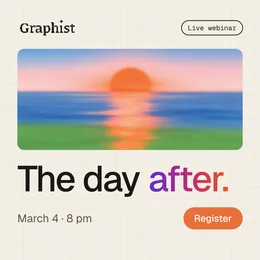
Tuesday, 5 pm. Thursday’s LinkedIn post exists as a square; the story and the banner are missing. In the Graphist studio, you ask for both formats: each one is laid out again, with the same message. One download gives you all three, in a ZIP file.
Cropped
The logo and the button fall out of frame.
Recomposed
The same message, one layout per format.
An AI tool alone, or connected to your brand
 Without a coded brand
 What it adds, on top
[01]The real logo
Claude alone: A logo that looks like yours, redrawn in every image.
Graphist: Your original file, never redrawn or reinvented.
[02]The real font
Claude alone: A lookalike font, picked by the machine.
Graphist: Your fonts loaded as they are, in the weights of your guidelines.
[03]Crisp, editable text
Claude alone: Text baked into the image: one typo, and everything has to be regenerated.
Graphist: Every word stays text, and a typo is fixed in one click.
[04]One visual, every format
Claude alone: A cropped image: the subject falls out of frame, the message gets lost.
Graphist: The same message recomposed for each format, not cropped.
What your teams use
- StudioOne brief · 3 formats · recomposed
 1:1
1:1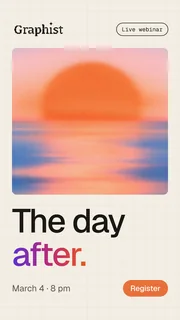 9:16
9:16 1.91:1
The Graphist studio
A brief, one of your brand templates, and the visual comes out. Text, position and color are fixed live, and every version stays visible.
- AI assistantsDraft our launch post for LinkedInClaudeUsing your brand from Graphist: logo, colors, fonts and tone of voice.Graphist connected · revoke anytime
Claude and Cursor
Your AI assistants connect to your brand in Graphist, through an MCP connector (MCP is a standard plug that connects an AI assistant to your tools). They use your real logo, fonts and colors.
- PresentationsFall launch · 6 slidesBeta
- 01Title
- 02The problem
- 03Three key figures
- 04What changes
- 05Product demo
- 06Next steps
Presentations, in beta
A brief, an outline, then the slides in your brand templates. The text is fixed right on the slide.
- VaultWhat Graphist knows · 151 factsBeta
- 2,400 customers in Europe↗ home page
- Tone: direct, warm↗ guidelines, p. 12
- Next webinar: March 12↗ Events page
The Vault, in beta, the memory of your company’s facts
Graphist picks up the facts from your website and from the documents you give it, each with its source. Your visuals name the right products and the right figures.
Frequently asked questions
Does Graphist generate images?
No. It places your texts, your logo and your images in one of your brand templates, with your real fonts and real colors. It never invents a brand element.
Does it work with our AI tools?
With Claude and Cursor, yes, and with other MCP-compatible assistants. Anyone connects theirs to your brands in a few minutes, from Graphist, and can cut access at any time.
Which formats?
Posts, stories and carousels for social, ad formats, custom sizes and presentations. Several visuals in one go if you need, and all the formats of a visual in a single ZIP file.
What if we have no photos?
Graphist starts from your brand’s images, from the ones you drop into the brief, or from a template without a photo.
Is the app available in English?
Yes: in French or English, each person picks. Handy for local teams.